How to Delete a Workspace in Cold Navigator
Written By Cold Navigator
Last updated 8 months ago
Effective management of your professional ecosystem sometimes requires decommissioning environments that are no longer in use.
Whether you are concluding a specific project or reorganizing your company’s structure, Cold Navigator provides a secure way to remove workspaces.
Please note that deleting a workspace is a permanent action that removes all associated data, leads, and campaigns within that specific hub.
1. Access Settings
Navigate to the "Settings" section on the left-hand sidebar and select the "Workspace" area to view your existing environments.
2. Identify & Select
Locate the specific workspace you wish to remove. Click on the three-dot (vertical ellipsis) menu located on the right side of the workspace entry.
3. Execute Deletion
From the dropdown menu that appears, select the "Delete" option to finalize the decommissioning of that workspace.
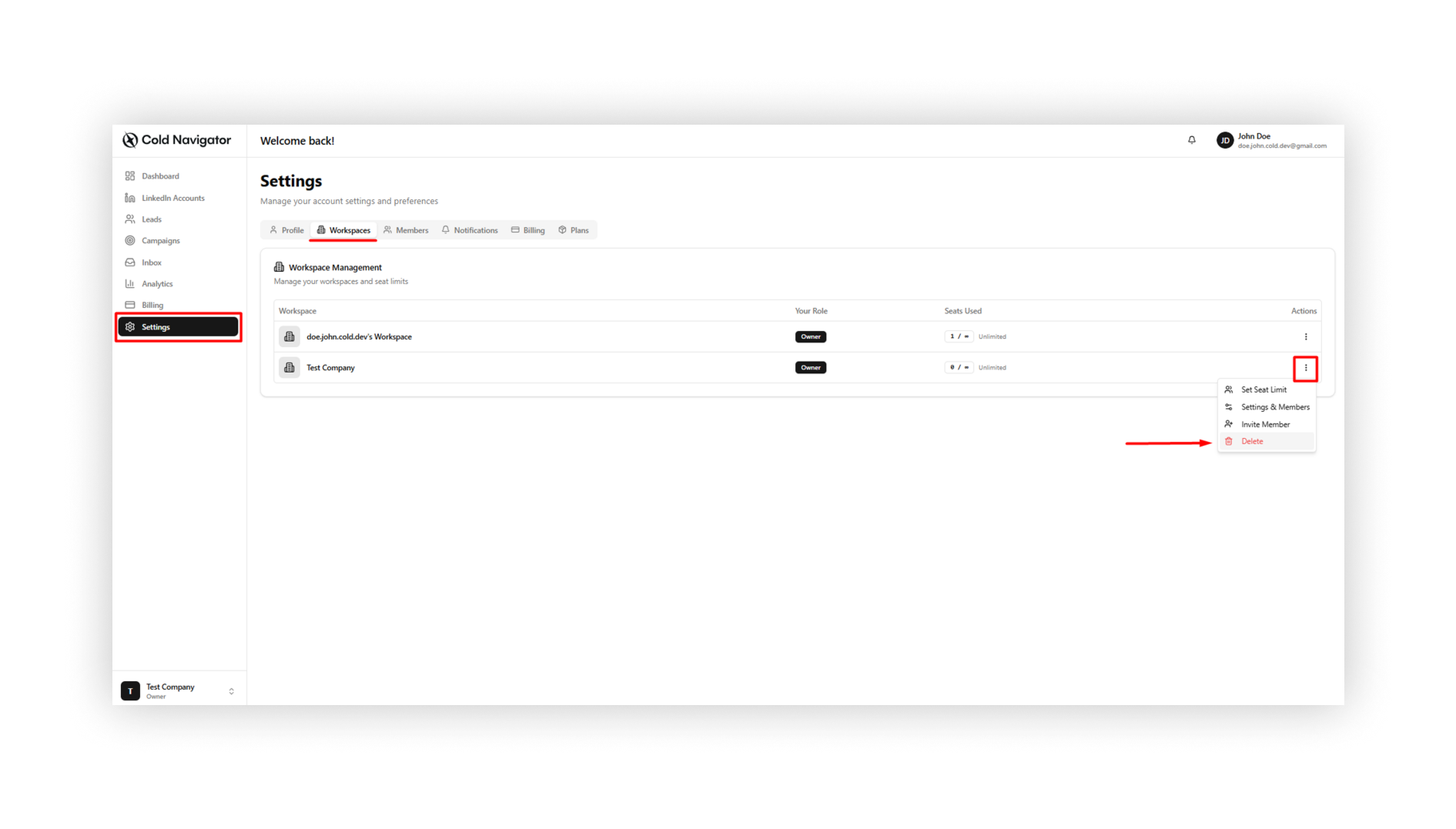
This guide detailed the secure process of deleting a workspace in Cold Navigator. By navigating to Settings > Workspace and utilizing the action menu, you can maintain a clean and focused dashboard by removing inactive or completed project environments.
Was this helpful?
Still need help? Ask the team